
Neural networks
Cheat AI [Naim Ai]
Looking for private AI software for mobile shooters on Android? Naim Mobile Android, featuring modern AI-powered features , is available at up-game.pro. The software is designed for use in a variety of shooters and offers additional gameplay options. Naim Mobile Android is perfect for users looking for cheats with AI technology and user-friendly settings.
undetected
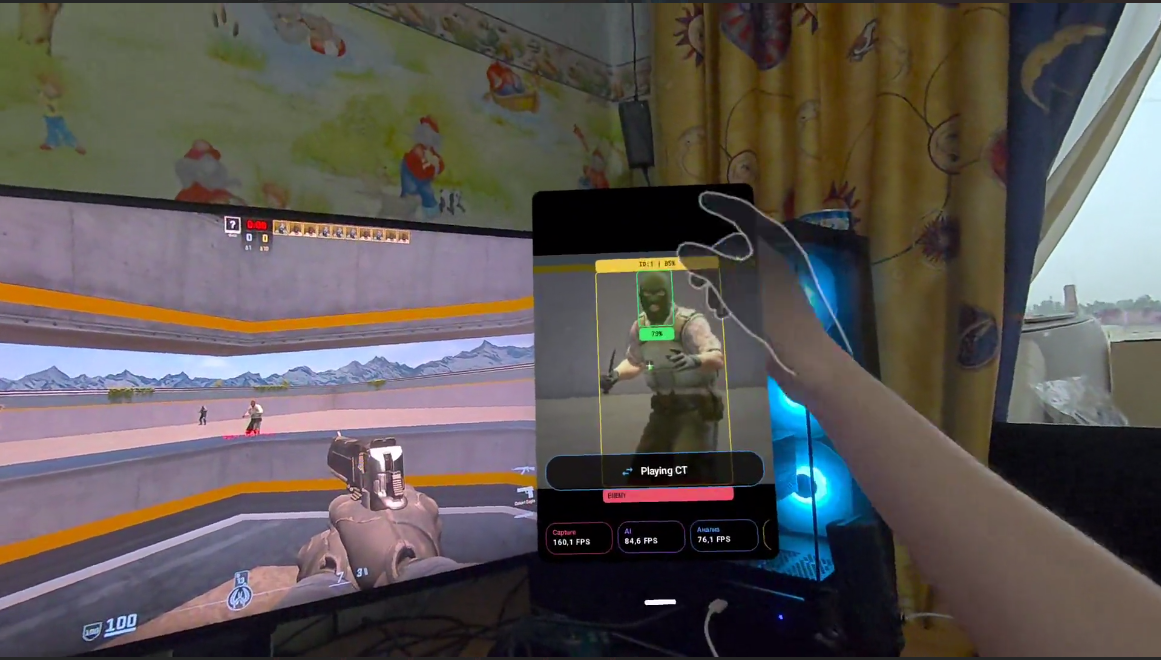
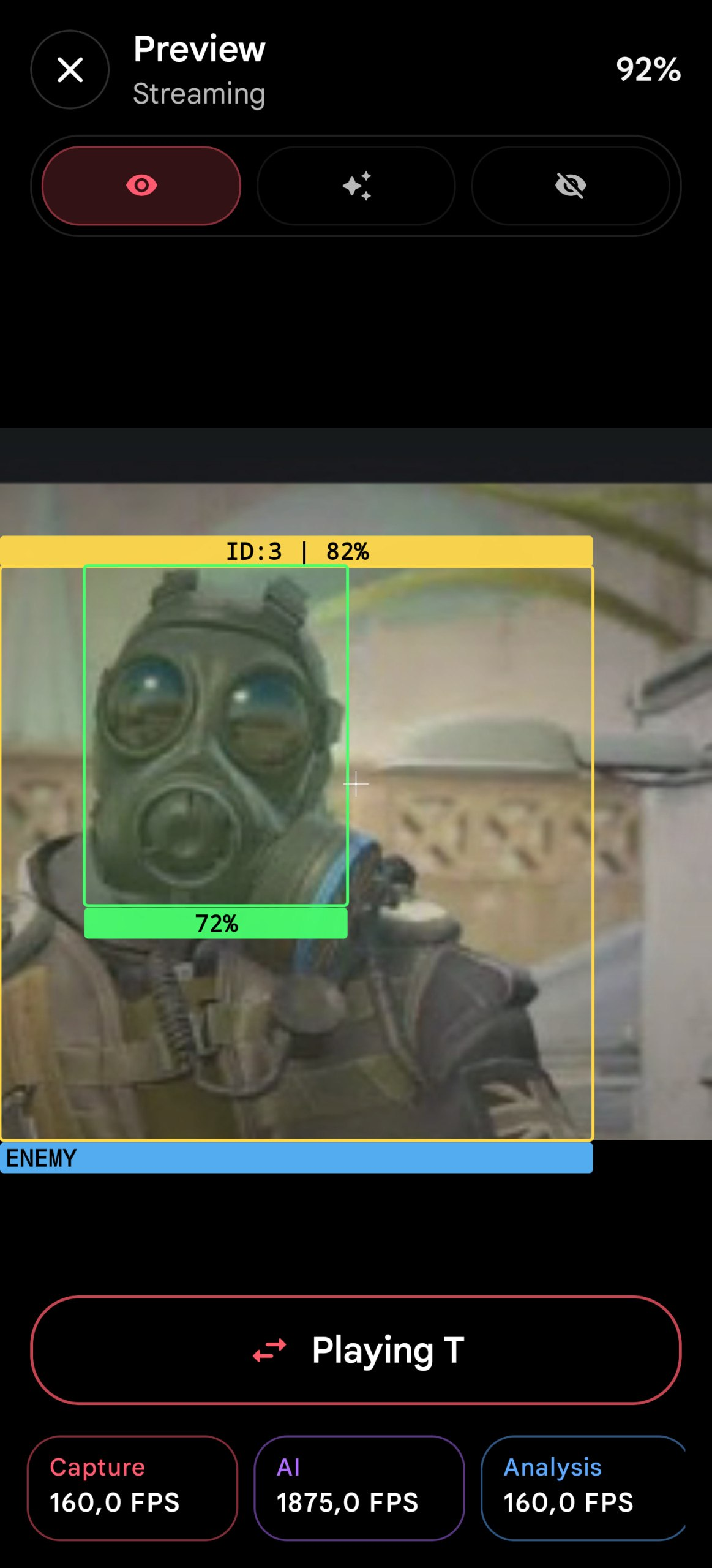
- **Automatic aiming**:
- - Automatically aims at the target closest to the sight.
- **Automatic shooting**:
- - If enabled, will automatically fire as soon as the crosshair is on an enemy.
- **Recoil Control**:
- - Compensates for weapon recoil for more accurate burst firing.
- **Aiming Assistance**:
- - If enabled, AIM will only work when the selected keys are pressed.
- **Flicker**:
- - A mode for sharp and rapid shots (flicks). Useful for sniper rifles.
- **Chance to hit**:
- - Disables shooting while your character is moving.
- **Displaying targets**:
- - Displays enemies visible to the neural network.
- **Focus Area (FOV)**:
- - Displays the radius around the crosshair in which the functions will be activated.
- **Information**:
- - Displays information about current performance (FPS/Latency), settings, etc.
- **Other settings**:
- - Displays text information next to the detected target and a watermark at the top left.
- **Auto-detection of weapons**:
- - Displays the slot and weapon that was recognized by the automatic weapon detection system.
- **Hiding the menu**:
- - Settings to disable error and information information.
- **Security Settings**:
- - Various settings for hiding from anti-cheats and screen recording programs.
- **Additionally**:
- - Important neural network settings that can radically change AI behavior.
- **Maximum sensitivity**:
- - Determines how quickly the reticle will move toward the target. Sets the aiming speed if the target is far from the reticle.
- **Minimum sensitivity**:
- - Determines how quickly the reticle will move toward the target. Sets the aiming speed when the target is close to the reticle.
- **Target of the tip**:
- - Allows you to configure the part of the body that will be targeted.
- **X-axis guidance**:
- - Enables or disables horizontal aiming.
- **Y-axis guidance**:
- - Enables or disables vertical aiming.
- **Post-kill delay**:
- - Adjusts the delay after killing a target for targeting the next one. It also affects how long the neural network will search for an enemy after that.
- How he disappeared. Minimum: 0.02, since the enemy can disappear for 1-2 frames but not actually die.
- **Rate of fire**:
- - Adjusts the mouse click rate. If 'Full' is selected, the left mouse button will be held down while the enemy is in the crosshairs.
- **Delay before shooting**:
- - Changes the delay before the first shot, useful for 'FastZoom' on sniper rifles.
- **Trigger Key**:
- - Pressing it will trigger an auto-shot if the switch on the right is on.
- **Key enable**:
- - If enabled, shooting will only occur if the key on the left is held down.
- **Assist Delay**:
- - Changes the amount of time Assist will run after the bind key is released.
- **Aim Key #1**:
- - Pressing this key will trigger target acquisition.
- **Aim Key #2**:
- - Pressing this key will trigger target acquisition.
- **Recoil Control Delay**:
- - Adjusts the RCS trigger delay to prevent it from triggering when tapping.
- **Control speed**:
- - The larger it is, the faster the sight moves down.
- **Return Speed**:
- - The higher the value, the faster the sight returns to its original position after recoil control.
- **Power of Control**:
- - The larger it is, the lower the sight can go.
- **Delay between flicks**:
- - The higher the value, the less frequently the key will be triggered when you hold it down. This is necessary to prevent the key from being triggered multiple times at once.
- **Firing Delay**:
- - After aiming at a target, you need to wait for the game engine to process the movement and for the crosshair to be on the enemy at the moment of clicking.
- **Sensitivity**:
- - It needs to be set up so that the sight is on the target in one click.
- **Trigger Key**:
- - This key will quickly move the mouse towards the enemy and fire.
- **Hunting radius**:
- - Changes the aiming radius, which is always centered on the screen. Values range from 1 to 999 (1 unit = 0.1% of the screen width).
- **Change aiming radius**:
- - Clicking the button will apply the value indicated on the left.
- **Screen scanning radius**:
- - Adjusts the neural network's 'vision' radius (range from 1 to 999, 1 unit = 0.1% of the screen width). Large is good for sniper rifles, small -
- for shooting from the hip.
- **Change scanning radius**:
- - Clicking the button will apply the value indicated on the left.
- **Blind Spot**:
- - Creates a blind spot to prevent the crosshair from tracking 100% when the enemy is stationary. A value of 0 will cause the crosshair to jitter when stationary.
- **Chance to hit**:
- - The higher it is, the less movement your character must make for AutoShot to work.
- **Selected weapon**:
- - Select the weapon you want to customize. To do this, use AutoWeapon.
- **Rectangle on target**:
- - Displays a rectangle around the detected target.
- **Indicator above target #1**:
- - Displays a red indicator above the target it is aiming at first.
- **Indicator above target #2**:
- - Displays a yellow indicator above the target it aims at second.
- **Neural network vision radius**:
- - Displays the area visible to the neural network. It moves if DynamicFov is enabled.
- **AIM aiming radius**:
- - Displays the zone in which aiming occurs when a target hits it.
- **Neural network confidence**:
- - Shows the neural network's confidence level next to the target, as well as its numbered identifier.
- **Watermark**:
- - Adds a watermark to the top left of the screen, displaying the title and version.
- **Display statistics**:
- - Displays settings information when pressing the Tab key.
- **FPS counter**:
- - Displays FPS and neural network/screen capture latency.
- **Frame Memory**:
- - Used by the FPS counter to find average latency and FPS values.
- **Current weapon information**:
- - Displays the selected slot and weapon if the AutoWeapon neural network is enabled.
- **Hide visual effects**:
- - Hides all visual effects located on this tab.
- **Hiding error messages**:
- - Hides error information in the corner of the screen.
- **Hiding from Alt+Tab**:
- - Hides the NAIM window among open windows in the system.
- **Hide on recording**:
- - Hides the menu on the screen recording while remaining visible on the monitor.
- **Always on top**:
- - Allows the menu to be located above all windows in the system.
- **Neural network selection**:
- - Choose the model you need. The ones at the top are the smartest but also the heaviest, while the ones at the bottom are the fastest but not the most accurate.
- **Confidence threshold**:
- - The higher the confidence threshold, the fewer false detections, but the worse the detection of real targets.
- **Neural network vision quality**:
- - The higher the resolution, the clearer the neural network sees the image on the screen; accuracy usually increases with magnification.
- **Change Fov**:
- - When clicked, it will change the neural network's vision resolution to the one specified in the input field on the left.
- **Model selection**:
- - Select a neural network model for automatic detection of weapons on the screen.
- **Neural network memory**:
- - The higher it is, the more stable the weapon detection will be, and the less often it will change 'randomly'.
- **Check frequency**:
- - The more - the higher the load, but the faster detection of weapons in the character's hands.
- **Autopause**:
- - Automatically disables features in the Aimbot tab when you exit the game.
- **Train the model**:
- - Train the weapon auto-detection model for your desired use case.
- **Get Help**:
- - If you have any questions about model training, click this button.
- **Aim Lag Compensation**:
- - Compensates for lag, allowing the crosshair to stay on the target as it moves. Not recommended for low sensitivity settings!
- **Humanization**:
- - Makes AIM's movement more human-like to prevent detection by server technologies.
- **Dynamic vision of the neural network**:
- - Allows the neural network's vision to move around the screen, rather than focusing solely on the center. Increases performance and accuracy!
- **Double check**:
- - Checks the additional detected target for authenticity, reduces false positives, but may worsen the detection of real ones
- goals.
- **Script name**:
- - Enter the script name or path to a local script here.
- **Add script**:
- - Adds the script entered in the input line above.
- **Documentation**:
- - Clicking on the button will open a page with documentation for developing scripts.
- **Delete script**:
- - Deletes the script selected on the right.
- **Publicity Change**:
- - Changes the availability of the script for other users who can add it by name.
- **Enable/Disable script**:
- - Allows you to change the state of a script in your system.
- **Gift Key**:
- - Enter your key here if you have one. They usually grant additional subscription days or access to subscription level 3.
- **Use**:
- - When pressed, uses the key entered in the input field on the left.
- **Process priority**:
- - Configures NAIM's priority on your system. The higher the priority, the better NAIM's performance.
- **Operating frequency**:
- - Allows you to configure the neural network's frequency. Mouse movements will be interpolated to ensure smoothness.
- **Change name**:
- - Changes the name of the selected config.
- **Delete config**:
- - Deletes the selected config.
- **Method of checking keystrokes**:
- - Changes the method of checking binds, useful when using 2PC.
- **Check frequency**:
- - Configures the frequency of bind checks. Does not affect MAKCU. Affects Kmbox and Software methods.
- **Screen Resolution**:
- - Adjusts screen resolution by width and height, useful when the game resolution differs from the monitor resolution.
- **Screen width**:
- - Changes the width for screen capture.
- **Screen height**:
- - Changes the height for screen capture.
- **Operating mode**:
- - Changes what the neural network runs on. It's recommended to use a GPU, even with an integrated graphics card.
- **Mouse Bypass Mode**:
- - Changes the mouse movement/click mode.
- **Screen Capture Mode**:
- - Changes the screen capture mode.
- **Additional settings**:
- - Allows you to configure the operation of the capture card if it is selected in capture mode.
- **Menu scaling**:
- - Adjusts the menu size, 100% is the original size.
- **Hardness settings**:
- - The higher this parameter, the more variable it can be. If your sight locks on an enemy when you turn on Predictor,
- movements - drag the slider to the right until the problem is fixed.
- **Automatic Confidence Adjustment**:
- - The algorithm analyzes the neural network's behavior and dynamically lowers the confidence threshold to avoid losing the enemy once they've been detected.
- **Logging**:
- - Enable to start recording logs. This may impact performance. To view, click the "Log viewer" button below.
- **Logging**:
- - Enable to start recording logs. This may impact performance. To view, click the "Log viewer" button below.
- **View logs**:
- - Opens a window displaying all information about recorded logs. It can also open third-party logs.
- **Shot Delay Compensation**:
- - Compensates for shot delay by shooting ahead, calculating how long it will take for the crosshair to be on the enemy.
- **Setting the lead**:
- - The higher this parameter, the sooner the shot will occur before reaching the target.
- **Blind Spot**:
- - Set up zones where the neural network will see nothing but emptiness.
- **Change zones**:
- - Add and edit zones, close the UI or your character to avoid unnecessary detection.
- **Quick Reboot**:
- - Reloads internal functions several times faster than a full restart of NAIM.
- **Predictor**:
- - Predicts in real time the position of targets several frames ahead, taking into account many parameters as well as the current situation.
- **Side Key Interception**:
- - Intercepts the side keys so that they are not pressed on the main computer and it is not visible that you are pressing them. At the same time, the bind on
- The side keys will continue to work. Only for 2PCs, requires the hardware binding method.
- **Chatbot**:
- - Your companion for navigating menus and adjusting settings. If you have a problem, complain to him, and he'll help. (Or at least try.)
Game client:

In-game
Supported processors:

USB HUB for phone
OC:

Android / Mac / Supports all shooters
Spoofer:

None
Anti cheat:

In-game
Game Mode:

All




No reviews yet.