
Wardogs Cheat [Pure DMA]
Looking for a reliable and functional cheat for WARDOGS DMA? Up-game.pro offers proprietary Pure software with a comprehensive set of gaming features. AIMBOT support is designed for more convenient aiming during gameplay.
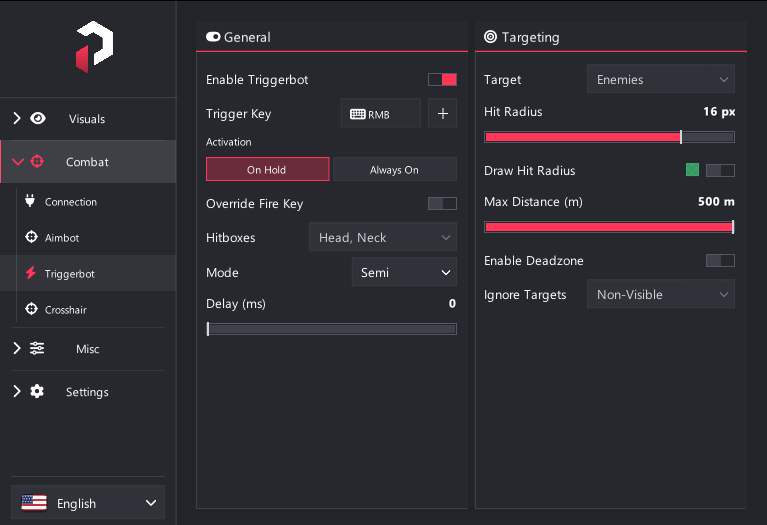
- Aimbot
- Hardware Aimbot - hardware-assisted aiming
- Aim keys - aiming keys, hold, or always-on
- Hitboxes - head, neck, chest, pelvis, arms, legs
- Targets - enemies, AI, allies, vehicles
- Priority - priority by aim, distance, or HP%
- FOV - adjustable/dynamic FOV
- Draw FOV Circle - displays the targeting radius
- Deadzone - setting the dead zone
- Draw Deadzone - displaying the deadzone
- Smoothing - smoothness of guidance
- Aim Curves
- Max Distance - aimbot distance limit
- Ignore Non-Visible - ignore invisible targets
- Target Lock Delay - target lock delay
- Triggerbot - Automatically shoots at a target
- Trigger Delay - shot delay
- Hit Radius - the radius of the trigger
- Crosshair - custom crosshair overlay
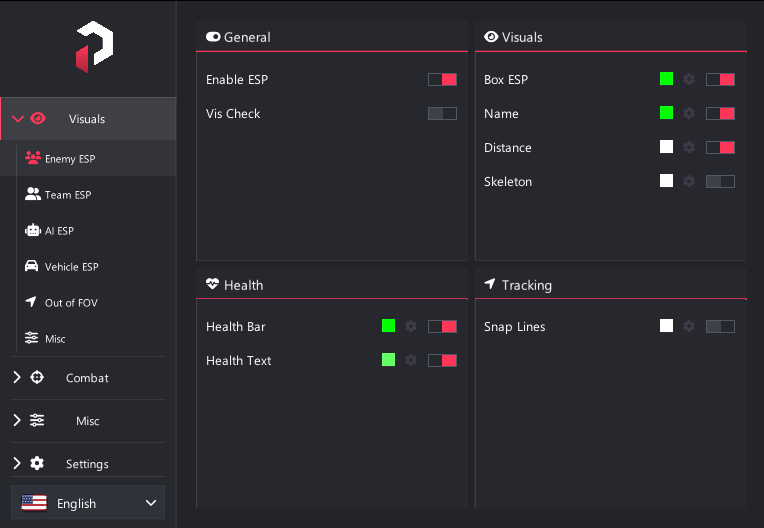
- VISUALS
- Loot Bags - items dropped and dropped upon death
- Dropped Items - display of items
- Death Drops - display of death drops
- Distance - distance to loot
- Loot Colors - color customization
- Loot Limits - distance limits
- RADAR
- Mini Radar - display of a mini-radar
- Shape - round or square
- Size - radar size
- Range - radar range
- Opacity - radar transparency
- Enemy Blips - enemy blips
- Teammate Blips - Ally Points
- AI Blips - AI dots
- Vehicle Blips - transport points
- Look Direction
- Distance Text
- Blip Scale - marker size
- Radar Colors - customize radar colors
- MISC
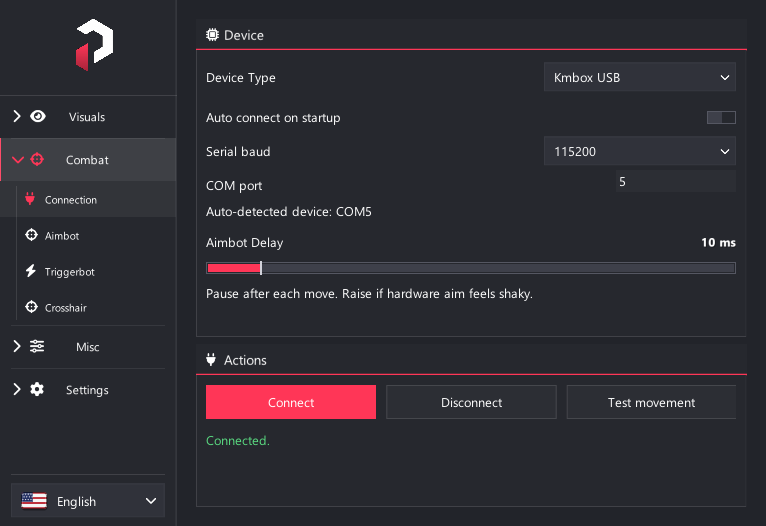
- Connection - Kmbox USB, Kmbox Net, Macku, Macku Controller
- Auto Connect - automatic connection at startup
- COM/Baud - USB connection settings
- Network IP / Port / MAC - network device settings
- Connect / Disconnect - device management
- Test Movement - movement test
- Aimbot Delay - reduce shaking
- Transparent Overlay
- One PC Mode - one PC mode
- FPS Counter - displaying FPS
- Monitor / Custom Resolution - overlay resolution settings
- Menu Toggle Key - menu key
- Menu Scale - interface scale
- Accent Color - menu color
- Rainbow Theme
- High-Contrast Menu
- ESP Font - font selection
- Reattach to Game - reconnect to the game
- Close Cheat - closes the application
Game client:

In-game
Supported processors:

INTEL / AMD / Flash Drive: Need a second computer or laptop (minimum 8GB RAM and 4 cores), Start
OC:

Windows 10/11 / BIOS: StandardDMA, LeetDMA, EnigmaDMA, SquirrelDMA, ScreamerR03, ScreamerR04, CaptainDMA, ScarletDMA, RaptorDMA, TerminatorDMA / DMA card speed greater than 4500
Spoofer:

None
Anti cheat:

In-game
Game Mode:

All
Related Products

What do I need to start using DMA cheat?

Two computers
One of which could be a laptop.

Free PCIe slot
Make sure your host computer has at least one free PCI-Express slot to install a DMA card.

USB 3.0 cable
You can buy it

Windows 10 or 11
Our DMA card and cheat code support Windows 10 and Windows 11 up to version 24H2.
Reviews
You can leave a review by logging into the site.


No reviews yet.